Salesforce is the backbone of operations for countless businesses, streamlining everything from sales and marketing to customer service. Yet, like any sophisticated platform, it can sometimes present challenges. When things don’t run smoothly, mastering Salesforce support and understanding effective troubleshooting is paramount. This ultimate guide will equip you with the knowledge and strategies to diagnose issues, optimize performance, and ensure your Salesforce instance operates at peak efficiency.
💡 Key Takeaways
- Implement systematic troubleshooting steps for quick issue resolution.
- Proactively optimize Salesforce configurations to prevent common problems.
- Leverage Salesforce resources and communities for enhanced support.
- Continuously train users to reduce support ticket volume and improve adoption.
“Effective Salesforce support isn’t just about fixing issues; it’s about building a resilient, user-centric system that drives adoption and maximizes ROI. Proactive optimization is key.”
— Michael Adams, CRM & Automation Implementation Lead
From navigating common user errors to addressing complex system glitches, we’ll delve into the best practices for maintaining a healthy Salesforce environment. Whether you’re an administrator, a power user, or simply grappling with a specific problem, this resource aims to be your definitive roadmap to achieving Salesforce mastery.
In This Article
- — 💡 Key Takeaways
- → Understanding the Salesforce Support Ecosystem
- — 🛠️ Internal Support vs. Salesforce Official Support
- — ➡️ Key Salesforce Support Channels
- → Common Salesforce Issues & Initial Troubleshooting Steps
- — 👤 User-Specific Problems: Login, Permissions, Data Entry
- — 📉 System-Wide Glitches: Performance, Integrations, Automation
- — 🔎 The Importance of Replication and Documentation
- → Submitting an Effective Salesforce Support Ticket
- — 📝 What Information to Include in Your Ticket
- — 🚨 Setting Priority Levels
- — 📈 Tracking Your Salesforce Support Ticket
- → Proactive Optimization Strategies for Salesforce Performance
- — 🗄️ Data Management & Cleanup
- — ⚖️ Apex Governor Limits & Best Practices
- — ⚙️ Streamlining Automation: Workflows, Process Builders, Flows
- — 📊 Regular Audits and Health Checks
- → Leveraging Salesforce Service Cloud for Enhanced Support
- — 📚 Self-Service Portals & Knowledge Bases
- — 📞 Omnichannel Support Capabilities
- — ⚙️ Automation with Service Cloud
- → Best Practices for Ongoing Salesforce Maintenance
- — 🤝 User Training & Adoption
- — 🔄 Regular Updates & Sandbox Testing
- — 🤝 Partnering with Salesforce Experts
- → Conclusion
Understanding the Salesforce Support Ecosystem
Before diving into specific troubleshooting steps, it’s crucial to understand the layers of support available for your Salesforce instance.
🛠️ Internal Support vs. Salesforce Official Support
- ✅ Internal Support: For many organizations, the first line of defense is an internal Salesforce administrator or a dedicated IT team. These individuals are typically familiar with your specific customizations, data models, and business processes, making them ideal for handling user-specific issues like permission errors, data entry problems, or forgotten passwords.
- ➡️ Salesforce Official Support: When internal resources are stumped, or the issue points to a core platform problem, engaging directly with Salesforce support is the next step. Salesforce provides various support tiers (Standard Success Plan, Premier Success Plan, etc.) offering different response times and levels of expertise.
➡️ Key Salesforce Support Channels
Salesforce offers multiple avenues to get help, each suited for different types of queries:
- 💡 Salesforce Help & Training: Your go-to resource for official documentation, how-to guides, release notes, and known issues. This portal is invaluable for self-service troubleshooting.
- 💬 Trailblazer Community: An active online forum where Salesforce users, administrators, and developers share knowledge, ask questions, and collaborate. Often, a quick search here can reveal solutions to common problems.
- 🎫 Support Cases: For issues requiring direct assistance from Salesforce technical support, you open a support case through the Help & Training portal. This is where you submit your Salesforce support ticket.
Common Salesforce Issues & Initial Troubleshooting Steps
Many Salesforce problems can be resolved with a systematic approach. Here’s how to tackle some common scenarios:
👤 User-Specific Problems: Login, Permissions, Data Entry
- ✅ Login Issues:
- ➡️ Verify Username & Password: The simplest step, but often overlooked.
- 🔑 Check IP Restrictions: Ensure the user’s IP address is not blocked by Salesforce or your company’s network settings.
- 🔐 Review Security Settings: Account lockout policies or multi-factor authentication issues (e.g., with Salesforce Authenticator App) can prevent login.
- ⛔ Permission & Access Errors:
- 💡 Confirm Profile & Permission Set Assignments: Does the user have the necessary permissions for the object, field, or record they’re trying to access?
- 🔒 Check Sharing Rules & OWD (Organization-Wide Defaults): These can restrict record access even if object permissions are granted.
- 📝 Data Entry & Validation Issues:
- ⚙️ Examine Validation Rules: These prevent incorrect data from being saved. Understand the rule triggering the error.
- 🔄 Review Workflow Rules/Process Builders/Flows: Automation can sometimes prevent saves or modify data unexpectedly.
- 🎯 Check Field-Level Security: Ensure the user can edit the field in question.
📉 System-Wide Glitches: Performance, Integrations, Automation
- 🐢 Performance Degradation:
- 📊 Monitor Daily Usage: High concurrent users or complex reports/dashboards can slow things down.
- 🗑️ Data Volume: Excessive data can impact query performance. Consider archiving or deleting old, unneeded records. For more on CRM optimization, see Salesforce CRM Optimization Tps and Best Practices.
- ⚡ Custom Code & Apex: Inefficient Apex triggers, Visualforce pages, or Lightning components can be culprits.
- 🔌 Integration Failures:
- 🔗 Check API Limits: Exceeding daily API call limits can halt integrations.
- 🔄 Review Authentication Tokens: Expired or revoked tokens are common integration breakpoints.
- ➡️ Inspect Integration Logs: Most integration tools or custom Apex will have logs detailing errors.
- 📧 Automation (Workflows, Processes, Flows) Issues:
- 🐛 Debug Logs: Use Salesforce debug logs to trace the execution of automation and identify where it’s failing.
- 🗓️ Trigger Order: Understand the order of execution for various automations on an object.
- ❌ Email Issues: If you’re experiencing problems with automated emails, consult our guide on Fixing Salesforce Automated Emails: Troubleshooting Inbox Issues.
🔎 The Importance of Replication and Documentation
For any issue, whether internal or external, the ability to replicate the problem consistently and provide thorough documentation is crucial. This speeds up diagnosis and resolution.
Mastering Salesforce Support: Troubleshooting & Optimization – A Review
Pros
- ✔Improved system performance and reliability.
- ✔Enhanced user productivity and satisfaction.
- ✔Reduced operational costs and downtime.
- ✔Better data quality and consistency.
Cons
- ✖Requires significant technical expertise and continuous learning.
- ✖Can be time and resource-intensive to maintain.
- ✖Complexity due to frequent platform updates and integrations.
- ✖Potential for misconfigurations if not handled by experts.
- 📝 Steps to Reproduce: Provide a clear, step-by-step guide on how the issue can be observed.
- 📸 Screenshots & Videos: Visual evidence is incredibly helpful.
- ✍️ Error Messages: Copy and paste the exact error messages received.
- ⚙️ Contextual Information: User ID, record IDs, timestamps, and any recent changes made to the system.
Submitting an Effective Salesforce Support Ticket
When you need to raise a Salesforce support ticket with Salesforce directly, maximizing its effectiveness will significantly reduce resolution time.
📝 What Information to Include in Your Ticket
- 🎯 Clear Subject Line: Concise and descriptive (e.g., “Performance Degradation on Opportunity Record Page” or “User unable to log in after password reset”).
- 💡 Detailed Description: Explain the problem, its impact on your business, when it started, and any specific users or records affected.
- ✅ Steps to Reproduce: As mentioned above, provide clear, numbered steps.
- 📸 Attachments: Screenshots, relevant error messages, debug logs.
- 🔄 Troubleshooting Already Performed: List what you’ve already tried (e.g., “Cleared browser cache,” “Checked user permissions,” “Confirmed no recent changes”).
- 👤 Impacted User IDs/Record IDs: Specific IDs help Salesforce support quickly identify the context.
🚨 Setting Priority Levels
Salesforce allows you to set a priority for your case. Choose wisely based on business impact:
- 🔴 Critical: Business is stopped, major data loss, production down.
- 🟠 High: Significant impact, but business can continue with difficulty.
- 🟡 Medium: Moderate impact, workaround available.
- 🟢 Low: Minor issue, no business impact.
📈 Tracking Your Salesforce Support Ticket
Once submitted, you can track your case directly within the Salesforce Help portal. Be responsive to requests for additional information from the support team. Proactive communication helps keep the resolution process moving.
Proactive Optimization Strategies for Salesforce Performance
Troubleshooting is reactive; optimization is proactive. Implementing best practices can prevent many issues from ever arising.
🗄️ Data Management & Cleanup
- 🧹 Regular Data Audits: Identify and remove redundant, obsolete, or trivial (ROT) data.
- 🚫 Duplicate Management: Implement Salesforce’s built-in duplicate rules or third-party tools to prevent duplicate records.
- 🗑️ Data Archiving: Consider archiving large volumes of historical data to improve query performance and stay within storage limits.
⚖️ Apex Governor Limits & Best Practices
Salesforce enforces governor limits to ensure fair resource allocation in its multi-tenant environment. Understanding and adhering to these limits is critical for custom code performance.
- 📈 Bulkification: Write Apex code that can handle large numbers of records efficiently, avoiding DML (Data Manipulation Language) operations or SOQL (Salesforce Object Query Language) queries inside loops.
- 📉 Query Optimization: Write selective SOQL queries, use indexed fields, and avoid non-selective queries on large objects. For an in-depth look, consider this resource on Mastering Salesforce Governor Limits and Performance Optimization.
- ⚙️ Asynchronous Processing: Use Batch Apex, Future methods, Queueable Apex, or Scheduled Apex for long-running processes or callouts.
⚙️ Streamlining Automation: Workflows, Process Builders, Flows
While powerful, poorly optimized automation can severely impact performance.
- ✅ Consolidate Automation: Instead of multiple automations on one object for the same event, consolidate them into a single Flow.
- ➡️ Flow First: Prioritize Salesforce Flow over Workflow Rules and Process Builders, as Flows are generally more performant and versatile.
- 🧠 Efficient Logic: Design Flows with efficient paths, minimize queries, and avoid unnecessary loops.
📊 Regular Audits and Health Checks
- ⚙️ System Overview: Regularly review Salesforce’s “Company Information” and “System Overview” pages for key metrics like API usage, data storage, and file storage.
- 🛡️ Security Health Check: Use Salesforce’s built-in Security Health Check to identify potential vulnerabilities in your security settings.
- 🔄 AppExchange App Review: Periodically review installed AppExchange apps, removing any that are no longer used or providing value.
Leveraging Salesforce Service Cloud for Enhanced Support
For organizations serious about customer support, Salesforce Service Cloud transforms the support experience, making it more efficient and customer-centric.
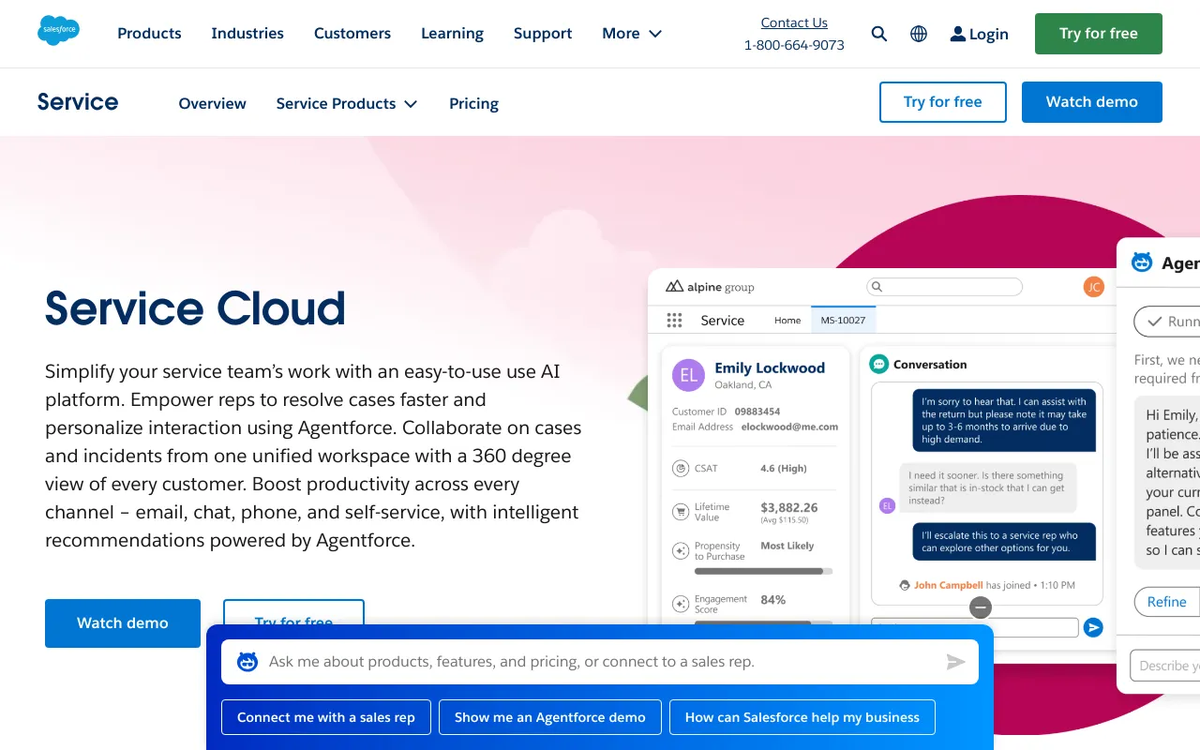
Salesforce Service Cloud
Transform your customer service into a powerhouse of efficiency and satisfaction with Salesforce Service Cloud. Consolidate all customer interactions, empower agents with 360-degree views, and automate workflows to resolve issues faster and deliver personalized experiences that build lasting loyalty. Reduce operational costs while significantly boosting customer retention.
📚 Self-Service Portals & Knowledge Bases
- 💡 Empower Customers: Service Cloud allows you to build customer-facing portals where users can find answers to common questions through a knowledge base, submit cases, and track their status.
- ✅ Reduce Case Volume: A robust knowledge base can significantly deflect simple inquiries, allowing your agents to focus on complex issues.
📞 Omnichannel Support Capabilities
Service Cloud enables support teams to engage with customers across various channels, providing a seamless experience:
- 💬 Live Chat: Real-time assistance through your website.
- 📞 Telephony Integration (CTI): Integrates phone systems directly into Salesforce for call management and screen pops.
- 📧 Email-to-Case: Automatically converts emails into support cases.
- 📱 Social Customer Service: Monitor and respond to customer inquiries on social media platforms.
⚙️ Automation with Service Cloud
Service Cloud leverages Salesforce’s powerful automation capabilities to streamline support processes:
- ➡️ Case Assignment Rules: Automatically route cases to the correct agent or queue based on criteria.
- 💡 Escalation Rules: Ensure critical cases are addressed promptly by escalating them after a defined period if they remain unresolved.
- 🤖 Macros & Quick Text: Allow agents to quickly insert pre-written responses or perform common tasks with a single click.
Best Practices for Ongoing Salesforce Maintenance
Mastering Salesforce is an ongoing journey, not a one-time destination. Consistent maintenance ensures long-term success.
🤝 User Training & Adoption
- 🚀 Initial Onboarding: Comprehensive training for new users.
- 🔄 Refresher Courses: Periodic training sessions to reinforce best practices and introduce new features.
- 🗣️ Feedback Loop: Encourage users to provide feedback on usability and suggest improvements. High user adoption is key to maximizing your CRM & Marketing Automation: The Ultimate Guide investment.
🔄 Regular Updates & Sandbox Testing
- 🗓️ Stay Current: Salesforce releases three major updates per year. Stay informed about upcoming features and critical changes.
- 🧪 Sandbox Testing: Always test new features, significant configurations, or custom code in a sandbox environment before deploying to production. This prevents unexpected issues.
🤝 Partnering with Salesforce Experts
- 🌍 Consulting Partners: For complex implementations, migrations, or custom development, a certified Salesforce consulting partner can provide invaluable expertise.
- ✨ Managed Services: Some partners offer ongoing managed services to handle administration, support, and optimization tasks, freeing up your internal team.
Recommended Video
Mastering Salesforce support, troubleshooting, and optimization is not just about fixing problems when they arise; it’s about building a robust, efficient, and user-friendly Salesforce environment. By adopting proactive strategies, understanding the available support channels, and continuously optimizing your instance, you can ensure Salesforce remains a powerful asset driving your business forward. Consistent attention to detail, coupled with strategic planning, will empower your organization to leverage Salesforce to its fullest potential, turning challenges into opportunities for growth and efficiency.
What are the most common Salesforce support issues?
Common issues include user access problems, data discrepancies, workflow rule errors, integration failures, and performance bottlenecks within the platform.
How can I proactively optimize my Salesforce instance?
Optimization involves regular data clean-up, streamlining workflows, auditing security settings, consolidating redundant custom fields, and leveraging declarative tools over complex code where possible.
Where can I find official Salesforce resources for troubleshooting?
Official resources include Salesforce Help & Training, Trailhead (for learning modules), the Salesforce Success Community, and the official documentation within your Salesforce org.
Salesforce Service Cloud
Ready to take the next step? See how Salesforce Service Cloud can help you achieve your goals.